




 Plustek
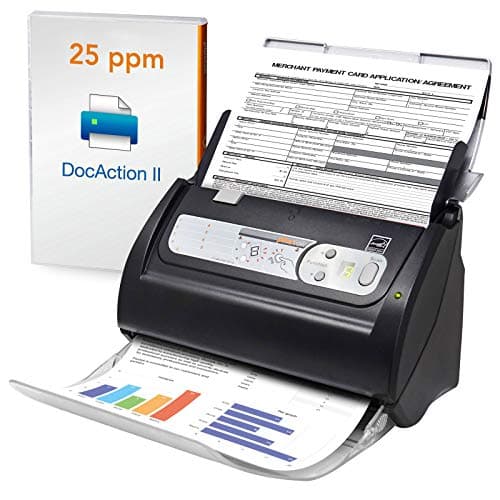
The Plustek PS186 is a compact desktop document scanner designed to make everyday paper-to-digital work easier. It includes a 50-page automatic document feeder, USB connectivity, OCR for searchable and editable files, and support for up to 255 customized favorite scan settings through Single Touch. Its barcode function can automatically categorize documents, while built-in image processing helps rotate, crop, straighten, and remove blank pages. The scanner can also send files to an FTP server or personal NAS in PDF, JPEG, TIFF, or PNG formats.
$199.00
Lowest Price

When paperwork starts taking over your desk, the real problem is often not the number of pages but the time it takes to organize them. The Plustek PS186 is a compact, user-friendly document scanner designed to make everyday paper-to-digital work easier. If you are also setting up a complete office workflow, you can explore related Printers on CouponOffer to complement your scanning setup.
Scanning one page at a time can become tiring when you have invoices, receipts, forms, or records waiting in a stack. The 50-sheet automatic document feeder lets you load multiple pages together, helping you handle batch scanning with fewer manual steps.
You can prepare a group of documents and let the scanner work through them instead of repeatedly placing each sheet by hand. For a small office or busy home workspace, that can make routine document processing much more comfortable.
Not every document needs the same scan configuration. The Plustek PS186 lets you customize up to 255 favorite scan file settings through its Single Touch feature, so frequently used workflows can be easier to access.
If your office repeatedly scans the same types of forms, invoices, or records, you can save appropriate settings instead of configuring them from scratch each time. That makes your regular scanning routine more consistent and user-friendly.
Imagine searching for an old invoice and finding it in seconds instead of opening dozens of image files. The PS186's OCR functionality can turn scanned paperwork into searchable and editable digital files.
It also supports searchable PDF creation, which is useful when you are building a digital document archive. For businesses trying to reduce their dependence on physical paperwork, this feature can make stored documents much easier to find and work with.
Large batches of paperwork can be difficult to sort manually, especially when documents already contain identification barcodes. The PS186 includes an Info Barcode function that can work with 1D and 2D barcode pages to help categorize documentation and data.
If your workflow depends on barcode-based records, this can reduce repetitive organization work and help you move scanned documents into a more structured digital system.
Pages do not always enter a scanner perfectly straight, and manually correcting every scanned file can waste time. Plustek's image-processing features include automatic rotation, cropping, and deskewing to help improve the appearance of digital documents.
You can spend less time fixing basic alignment problems after scanning. This is particularly useful when processing a large batch where manually correcting every page would quickly become inconvenient.
Blank pages can accidentally appear between scanned documents and make digital files unnecessarily long. The PS186 includes blank-page removal to help eliminate unwanted empty pages during scanning.
For multi-page reports and business records, cleaner digital files are easier to review, share, and store. You can also avoid carrying unnecessary blank pages into your document archive.
Different documents may need different formats depending on how you plan to use them. The Plustek PS186 supports PDF, JPEG, TIFF, and PNG, giving you several practical choices for saving scanned content.
You might use PDF for business records, JPEG or PNG for certain images, or TIFF when a different document workflow requires it. Having multiple options makes the scanner more adaptable to everyday office needs.
Keeping every scanned document on one computer is not always convenient when several people need access. The PS186 can send scanned files to an FTP server or personal NAS, allowing compatible network-based storage to become part of your workflow.
For a small business already using shared storage, this can make document distribution easier. Instead of moving files manually from one workstation to another, you can direct them toward an appropriate network destination.
The PS186 provides a listed resolution of up to 600 dpi, giving you useful detail for everyday paperwork and business records. It is designed around practical document scanning rather than requiring an oversized professional setup.
Whether you are digitizing forms, receipts, invoices, or general office paperwork, the available resolution provides a suitable foundation for creating clear digital copies.
If you prefer a dedicated scanner connected directly to your office computer, USB connectivity keeps the setup simple. You can place the PS186 beside your workstation and connect it to a compatible computer without needing a complicated installation.
For a home office or small business where scanning is handled from one primary workstation, this straightforward connection can be convenient.
Your office does not need another oversized machine taking up valuable workspace. The PS186 weighs approximately 3.66 pounds and measures around 10.36 inches wide, 5.02 inches deep, and 5.83 inches high.
Its compact desktop footprint makes it easier to position beside your computer or other office equipment. If you are working with limited desk space, the smaller design can be a practical advantage.
The listed 24-bit color depth allows the scanner to capture color information from suitable originals. This can be helpful when your documents include colored logos, graphics, receipts, or other visual elements that you want to retain.
For everyday document management, it provides a useful level of color capture without making the scanner unnecessarily complicated.
The Plustek PS186 is listed as compatible with Windows 7, Windows 8, Windows 10, and Windows 11 on supported Intel or AMD systems. This makes it a practical choice for offices that already rely on Windows-based computers.
You can incorporate it into an existing desktop scanning setup rather than changing your entire workflow simply to accommodate a new scanner.
A good document scanner should do more than capture pages. It should help reduce the work that comes afterward. The Plustek PS186 combines a 50-sheet ADF, 255 customizable scan settings, OCR, barcode recognition, automatic image correction, blank-page removal, flexible file formats, and FTP/NAS support.
If you want to compare similar document-scanning solutions before making your choice, you can also browse Scanners on CouponOffer. For a small business, home office, or professional workspace, the PS186 offers a compact and user-friendly way to turn piles of physical paperwork into searchable, organized digital records.
For more smart devices, browse our smart home and electronics offers. You can also check CouponOffer's latest deals before making your purchase.
$199.00
Lowest Price
In stock
$320.29
In Stock

Most compared products this week across all US retailers


Plustek PS186 Desktop Document Scanner | 50-Sheet ADF | OCR | 600 dpi | USB | Single-Touch Scanning | Barcode Recognition
$199.00
$0.00


Plustek PS186 Desktop Document Scanner | 50-Sheet ADF | OCR | 600 dpi | USB | Single-Touch Scanning | Barcode Recognition
$199.00
$0.00
Amazon
Plustek PS186 Desktop Document Scanner | 50-Sheet ADF | OCR | 600 dpi | USB | Single-Touch Scanning | Barcode Recognition
$320.29
$0.00
Plustek PS186 Desktop Document Scanner | 50-Sheet ADF | OCR | 600 dpi | USB | Single-Touch Scanning | Barcode Recognition
$320.29
$0.00
eBay
