




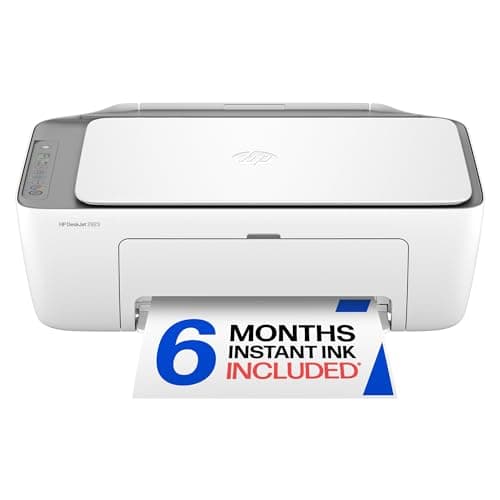
Need a simple printer for everyday home tasks without paying for features you may never use? The HP DeskJet 2923 is a compact color inkjet all-in-one printer designed for basic home printing, scanning, and copying. It supports wireless and mobile printing, offers a 60-sheet input tray, and delivers speeds of up to 7.5 pages per minute in black and 5.5 pages per minute in color. HP AI printing features can also help improve web page and email layouts, while the included 6-month Instant Ink trial adds extra convenience for regular home printing.
$39.99
Lowest Price

Choosing a home printer should not mean paying for features you may never use. The HP DeskJet 2923 is a compact, user-friendly color printer built around everyday needs such as printing letters, recipes, schoolwork, forms, financial documents, and shopping lists. If you want one machine that can print, scan, and copy without taking over your workspace, this budget-friendly all-in-one printer is worth considering.
Imagine you need to print a recipe while cooking, a school worksheet before leaving home, or a few household forms that are sitting on your phone. You do not necessarily need a large office printer for these small jobs. The DeskJet 2923 provides practical color printing for routine home paperwork and fits naturally into a smaller workspace.
For customers who mainly handle occasional or moderate printing, it offers a straightforward alternative to a more complicated office-focused machine. You can also explore our Scanners category if you need additional document-digitizing options for your home or workspace.
Waiting around for a few pages can be frustrating when you are already trying to finish a task. The HP DeskJet 2923 prints black documents at up to 7.5 pages per minute and color documents at up to 5.5 pages per minute.
These speeds are suited to everyday household printing rather than high-volume business production. Your routine documents, lists, letters, recipes, and school materials can be handled without needing a larger commercial-style printer.
You know that annoying moment when you start printing several pages and discover that the paper tray is almost empty. The 60-sheet input tray helps reduce those interruptions during normal home printing.
Whether you are printing school assignments, recipes, forms, or several letters together, you can load a useful amount of paper and get through smaller print jobs without constantly stopping to refill the tray.
Why clutter your desk with separate devices when one compact machine can handle common paperwork? The DeskJet 2923 combines color printing, scanning, and copying, giving you a convenient home document solution.
You can print a document, make a quick copy, or scan paperwork when needed without moving between different machines. For a study desk, home office, apartment, or small workspace, that all-in-one design can make daily tasks much easier.
Cable connections can become inconvenient when your printer is positioned away from your computer. The DeskJet 2923 supports dual-band Wi-Fi, helping you connect compatible devices wirelessly for everyday printing.
This is especially useful when your family uses different computers, smartphones, or tablets around the home. Instead of keeping everything connected to one desk, you can send supported print jobs over your wireless network.
Many of the documents you want to print are already stored on your smartphone. With mobile printing support, you can send compatible files to the printer without always moving them to a computer first.
Your recipes, school documents, shopping lists, forms, and downloaded files can become physical pages with fewer steps. If you regularly work with home-office equipment, our Printers category can also help you explore other printing options.
Different people use different devices, so having several connection options can make a home printer more flexible. The DeskJet 2923 supports Apple AirPrint, Mopria, and Wireless Direct alongside standard Wi-Fi connectivity.
That gives you more ways to connect compatible devices depending on the technology you already use. My goal when recommending a home printer like this would be to keep everyday printing simple rather than making you change your entire setup.
Printing a webpage or email does not always produce the clean result you expect. Unwanted sections, advertisements, or awkward formatting can sometimes consume extra paper and create unnecessary pages.
HP AI printing features are designed to help remove unwanted content and improve formatting for supported web pages and emails. When you simply want the useful information on the page, these features can help create a cleaner and more practical printout.
A home printer should not feel like a complicated piece of office equipment. The DeskJet 2923 uses an intuitive icon LCD control panel that keeps basic printer functions easy to understand.
For your everyday tasks, straightforward controls can make a difference. You can focus on printing, scanning, and copying rather than spending time trying to understand a complicated interface.
Running out of ink when you need to print something important is one of those small problems that can quickly become frustrating. The DeskJet 2923 includes a 6-month Instant Ink trial, giving you the option to have ink delivered automatically as supplies become necessary.
The supplied information states that the program can reduce ink costs by up to 50%. After the trial period, a monthly subscription fee applies unless you cancel the service, so you can decide whether the plan fits your printing habits.
A printer does not need to dominate your desk. At approximately 7.55 pounds, the HP DeskJet 2923 is relatively lightweight, making it easier to position in a home office, bedroom study area, apartment, or compact workspace.
If you move your printer between locations occasionally, its lighter design can also make handling more convenient. You get the usefulness of a multifunction printer without the bulk of many larger office machines.
If your printing needs are mostly everyday documents rather than hundreds of pages every day, choosing a large business printer may not make much sense. The HP DeskJet 2923 focuses on the essentials: color printing, scanning, copying, wireless connectivity, mobile printing, and convenient ink management.
For my customers looking for a best budget-friendly option for simple home printing, this compact all-in-one printer offers a user-friendly way to handle routine paperwork. It is particularly suitable when convenience, space-saving design, and basic wireless printing matter more than heavy-duty productivity.
For more smart devices, browse our smart home and electronics offers. You can also check CouponOffer's latest deals before making your purchase.
$39.99
Lowest Price
In stock
$131.98
In Stock

Most compared products this week across all US retailers


HP DeskJet 2923 Wireless Color All-in-One Printer | Print Scan Copy | 7.5 ppm Black | 5.5 ppm Color | 60-Sheet Tray | Mobile Printing | Dual-Band Wi-Fi
$39.99
$0.00


HP DeskJet 2923 Wireless Color All-in-One Printer | Print Scan Copy | 7.5 ppm Black | 5.5 ppm Color | 60-Sheet Tray | Mobile Printing | Dual-Band Wi-Fi
$39.99
$0.00
Amazon
HP DeskJet 2923 Wireless Color All-in-One Printer | Print Scan Copy | 7.5 ppm Black | 5.5 ppm Color | 60-Sheet Tray | Mobile Printing | Dual-Band Wi-Fi
$131.98
$0.00
HP DeskJet 2923 Wireless Color All-in-One Printer | Print Scan Copy | 7.5 ppm Black | 5.5 ppm Color | 60-Sheet Tray | Mobile Printing | Dual-Band Wi-Fi
$131.98
$0.00
eBay
